
Running ads · Updated September 16, 2026
Why is Google showing my ads outside my service area?
Updated September 16, 2026
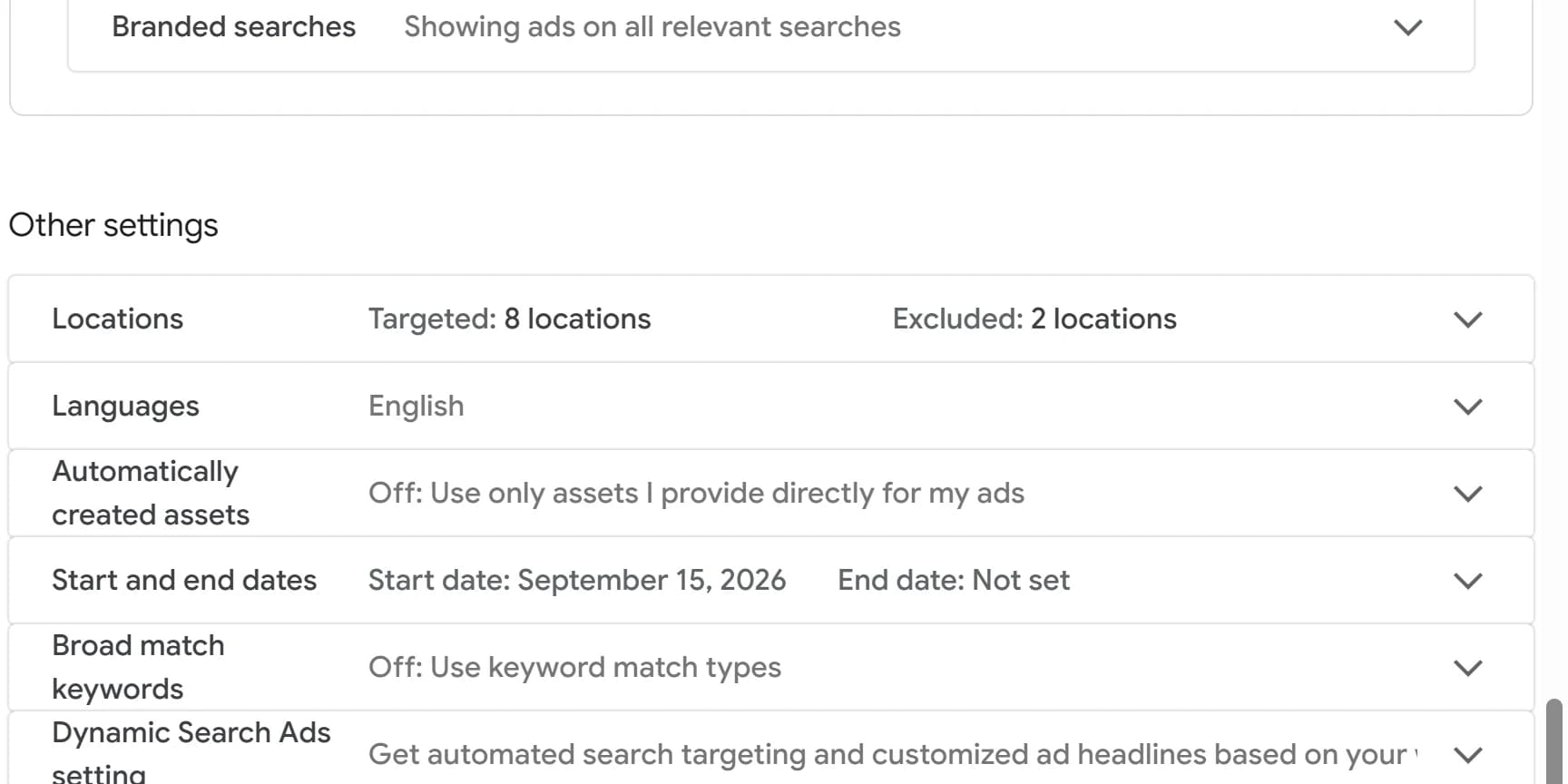
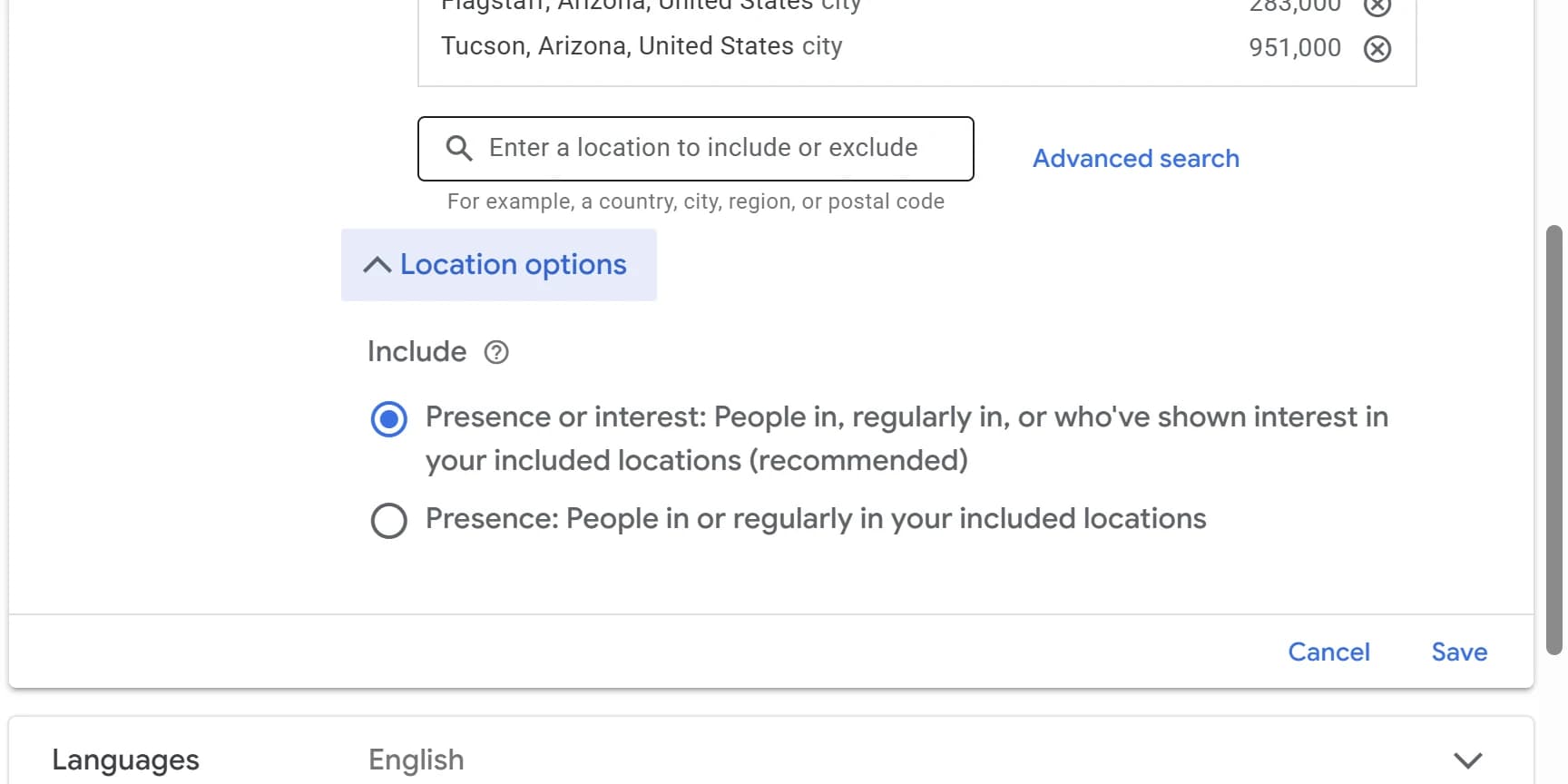
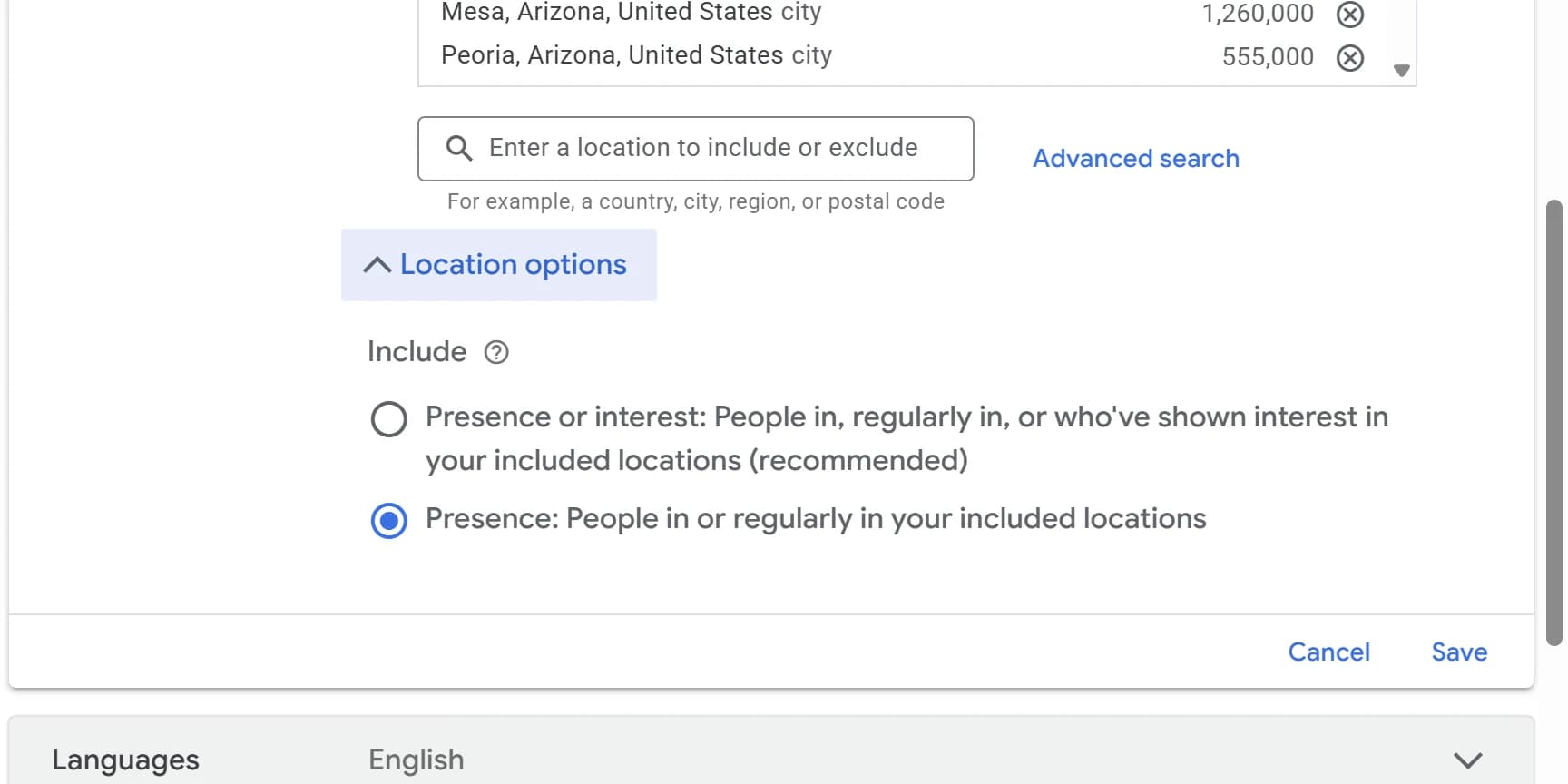
Because of a default setting. Every new Google Ads campaign starts on Presence or interest, which shows your ads to people anywhere who search for your area. Switch each campaign to Presence under Settings, Locations, Location options.
Google's default includes people who are not in your area
Every Google Ads campaign has a setting called Location options. It decides who counts as being in the places you target.
- Presence or interest
- People in, regularly in, or who've shown interest in your included locations. Google labels this one recommended and selects it for you.
- For a local business, interest is the problem. Google counts someone as interested in your area if they searched for it, were there recently, or read about it. None of that means they live there, and none of it means you can serve them.
- Presence
- People in or regularly in your included locations.
- Regularly in covers commuters. Someone who works in your area and lives one town over still counts. What Presence drops is the person whose only link to your area is a search, a past visit or something they read.
Google's default
Use this
For example
Someone in Denver searches "plumber phoenix" for a parent's house. Your Phoenix ad shows, and they call. Sometimes that is a real job. Usually it is a call you cannot take, and you paid for the click either way.
Every way someone can count as interested in your area
Google names three signals. Each one can reach a person who is nowhere near you.
What they search. A search that names your city, like "roofer scottsdale", signals interest in Scottsdale wherever it is typed. Searches in Google Maps count too.
Where they were recently. Someone who spent last week in your city and flew home can still count as interested in it.
What they read. Pages and sites about your area, like a moving guide or a travel article, signal interest too.
Presence ignores all three. It only asks whether the person is likely to be in your area, or is there regularly.
Your target area can reach past your service area
Presence limits your ads to people in the places you include. If those places are bigger than the area you serve, switching the setting will not fix it.
A county or metro instead of your cities. Target Maricopa County and your ads also reach Gila Bend, more than an hour's drive from downtown Phoenix.
A radius drawn around the shop. A circle ignores rivers, freeways and county lines, so a 25-mile radius can take in towns you never drive to. Google's own instructions say to check the map before you save one.
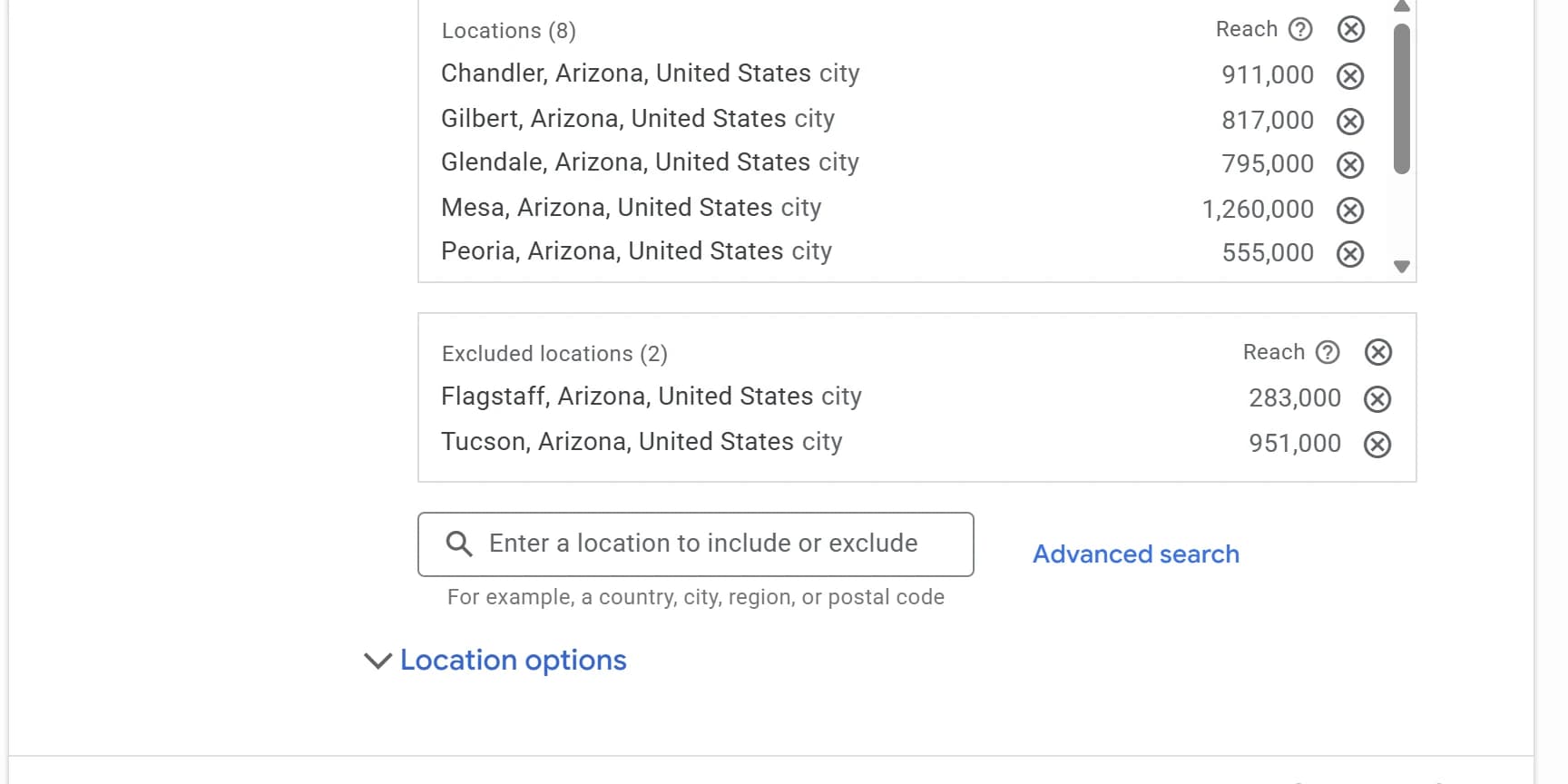
The right name in the wrong state. Glendale, Arizona and Glendale, California are separate targets, and so are Peoria, Arizona and Peoria, Illinois. The location list shows the state after every city, so read it.
Google can also go a little past your list on its own. When you target an area, it may show your ads in nearby, closely related areas it cannot target separately, like the small suburbs next to a city.
To check yours, open the campaign's Locations setting and read every line, and the map if you used a radius. Include the cities or zip codes you actually serve, and nothing bigger.
The fix
Switch each campaign to Presence
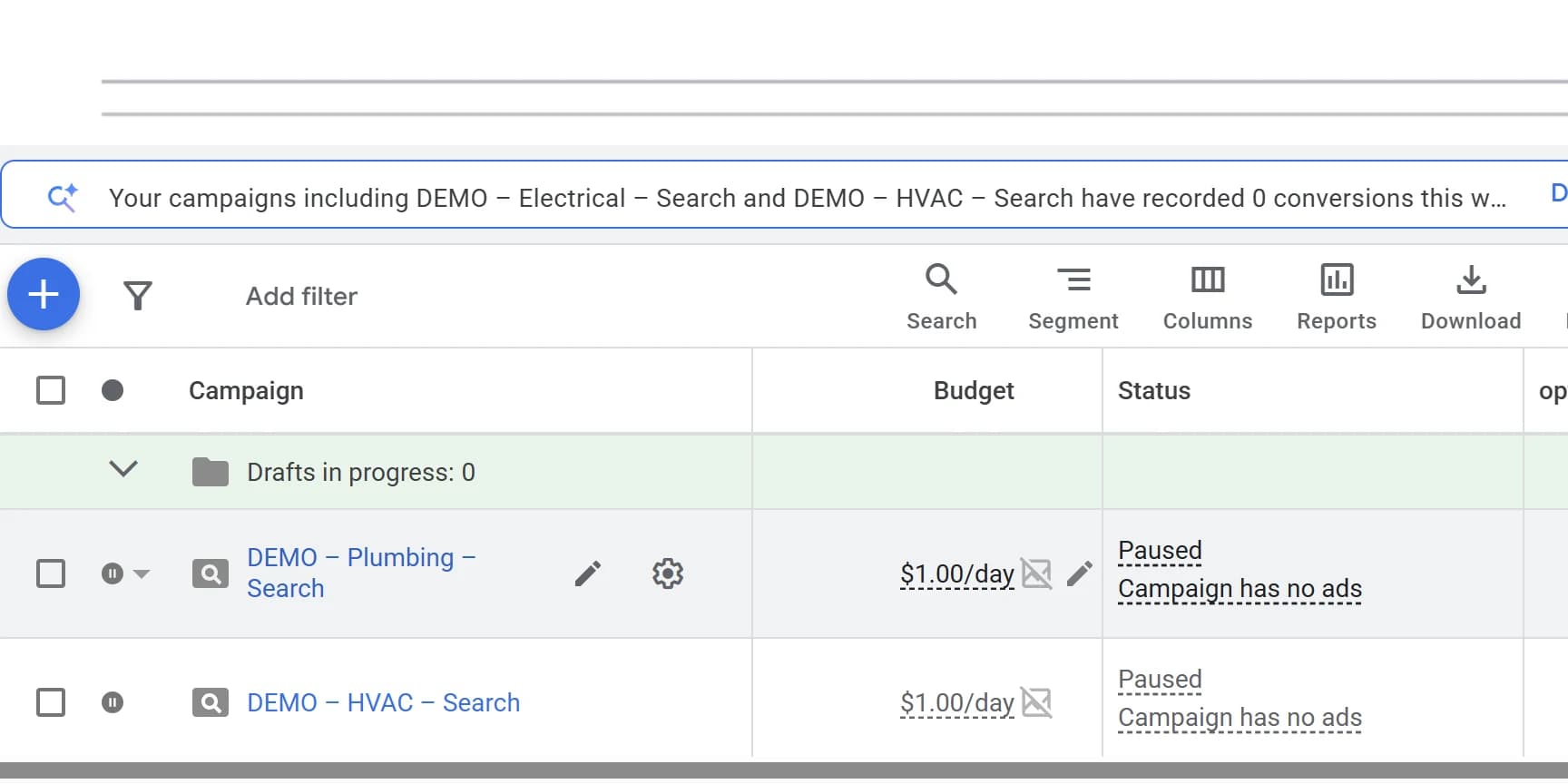
It takes under a minute per campaign. The setting belongs to each campaign, not to the account, so one fixed campaign tells you nothing about the rest. New campaigns start on the default again. Check each one the day it is built.
Performance Max and Local Services Ads
Performance Max campaigns have Location options too, and start on the same default as Search. Check them the same way.
Local Services Ads have no Location options, so there is no Presence to switch to. Google shows them to people in your service area and also to anyone, anywhere, whose search names a place in your service area. Someone in Denver who searches "plumber phoenix" can see a Phoenix plumber's Local Services Ad.
The service area is the only control. Leave out every city you do not serve. Removing a zip code blocks both the people in it and the searches that name it. To change it, open the Local Services lead inbox, go to Profile & budget, and edit the Service areas card.
What to set if your campaign uses AI Max
When you build a new Search campaign, Google turns AI Max on by default. It lets your ads match searches your keywords would not, using your landing pages and ads as well as your keywords. It also adds a location setting of its own on every ad group: Locations of interest.
The name is confusing. Google uses the same words for the places someone shows interest in under Presence or interest. The AI Max setting is a different thing, and it works the other way: it narrows who you reach instead of widening it.
It limits an ad group to searches about the places you list. Google looks at the place named in the search first. If the search names no place, it uses where the person is.
It works on top of Location options, not instead of them. A searcher has to pass both: be where the campaign's Location options allow, and be searching about a place on the ad group's list. For a Phoenix plumber with the campaign on Presence and the Phoenix metro cities listed:
"Emergency plumber" from Scottsdale can show the ad. The search names no place, so the searcher's own location counts, and Scottsdale is on the list.
"Plumber tucson" from Scottsdale cannot. The search names Tucson, which is not on the list. Without Locations of interest, AI Max can match it, and a click costs you money for a job you cannot take.
"Plumber phoenix" from Denver cannot either. Phoenix is on the list, but Presence keeps out people who are not in your area.
What to set: if a campaign has AI Max on, open each ad group, find Ad group settings for AI Max, select Locations of interest, and add every city you serve. A search naming a town you left off will not match, even from a customer down the street. You cannot list a place the campaign excludes. If AI Max is off, the setting does not exist.
Still seeing clicks from outside your area? Look for a pattern
On Presence, Google shows your ads to people it places in the areas you target, so there is no need to exclude the rest of the world. If clicks still come in from outside your area, look for a pattern: the same city showing up week after week.
How to spot one. In Google Analytics, break your Google Ads visits down by city, using the steps in "How to see where your ad clicks came from." One visit or call from another state is noise. Several from the same place over a few weeks is a pattern, and the next step is to exclude that place.
If it is more than a few, something is still set wrong. Check that every campaign really switched, including any built since, and that your target area is not bigger than your service area.
Why a few get through at all. Google places people using their device and connection: GPS, Wi-Fi, Bluetooth, cell towers and the IP address of the network they are on. A phone on cellular data can be placed wherever the carrier's network says it is, and a work network or VPN that routes through another city can place a laptop there. When those signals put someone inside your area, Presence lets them through.
Then exclude the places that keep showing up
Once a campaign is on Presence, an exclusion does exactly what you want: it stops your ads for people Google places inside that area.
To exclude a place, open the campaign's settings, expand Locations, search for the city or zip code and click Exclude, then Save. It moves to the Excluded locations list, and where an area is both included and excluded, the exclusion wins. Add more as new patterns show up.
Switch first, then exclude. An exclusion only blocks people Google places inside the excluded area. On Presence or interest, someone searching for your city from anywhere else is never inside it, so a list of blocked places never catches up. That is why the setting comes first.
Excluding a town inside your own target area
Exclusions also fix a hole inside your own map. If you target a 30-mile radius and do not serve the town across the river, exclude that town, and people Google places there stop seeing your ads.
What you give up by switching to Presence
Google says most campaigns show fewer ads after moving off the default. That is expected, and for most local businesses it is the point.
If you drive to the customer, or the customer has to come to you, the ads that disappear were mostly reaching people you could not serve. Judge the change on calls and booked jobs, not on impressions.
There are real exceptions. Google's own data found 5% more conversions on Search from the default for travel, real estate and education advertisers, whose customers often search from somewhere else before they arrive.
Google's own data
5%
more conversions on Search from the default, for travel, real estate and education advertisers only.
If you can only serve people who are already in your area, use Presence.
How to test the broader setting without betting the account
If you think out-of-town searchers could be real customers, test it on one campaign. Keep your main campaign on Presence, switch a smaller one to Presence or interest, and after a few weeks compare what each costs per booked job, not per lead.
Is it really your ads?
Not every out-of-town call is an ad problem
Rule these out before you change anything. Each one looks like bad targeting and is not.
Area codes do not show where someone is.
People keep their cell numbers when they move. A 312 number can belong to someone who has lived down your street for ten years.
Calls from your Business Profile are not ad clicks.
Your free listing on Google Search and Maps can be found from anywhere. Those calls cost nothing and have nothing to do with your ad settings.
Spam calls come from everywhere.
A few junk calls with strange area codes do not prove your targeting is broken.
Some out-of-town callers are real customers.
Adult children book help for a parent. People line up a contractor before they move in.
How to tell whether a call came from your ad
When your ad shows a phone number with call reporting turned on, Google puts a Google forwarding number in the ad and logs every call to it: when it started, how long it lasted, whether it connected and, for calls over 15 seconds, the caller's number.
A call that is not in that log did not come through the number in your ad. If your website swaps in a tracking number for visitors from ads, that number's call log does the same job for calls that start on your site.
How to see where your ad clicks came from
The location reports in Google Ads mix where people were with the places they searched for, so they cannot settle where a click came from. Google Analytics gets much closer.
The Matched locations report can hide the problem. Under Campaigns, Insights and reports, then When and where ads showed, it lists the locations that matched your ads. Google says those can be where people were or places they showed interest in, so a searcher in Denver who matched on Phoenix is counted as Phoenix. A list of your own cities does not prove the clicks were local. The Distance report has the same blind spot.
Google Analytics places visits by IP address. Open Reports, then Acquisition, then Traffic acquisition, search the table for "google / cpc" to keep only visits from your Google Ads, and break those down by city. Google says Analytics approximates each city from the visitor's IP address, so it shows roughly where people were, not what they searched for.
If nearly all of those visits come from your area, out-of-town calls are more likely spam, your Business Profile or long-kept cell numbers than your ads. If a real share comes from outside it, check the setting on every campaign and the area each one targets, then exclude the places that keep showing up.